Your agent says it works. Watch it.

Comment /runthru on a pull request. An agent uses the feature on your preview, films a narrated walkthrough, and a second model grades it, right in the PR.

Add to GitHub, free

Free for 5 videos a month. No card, no API keys.

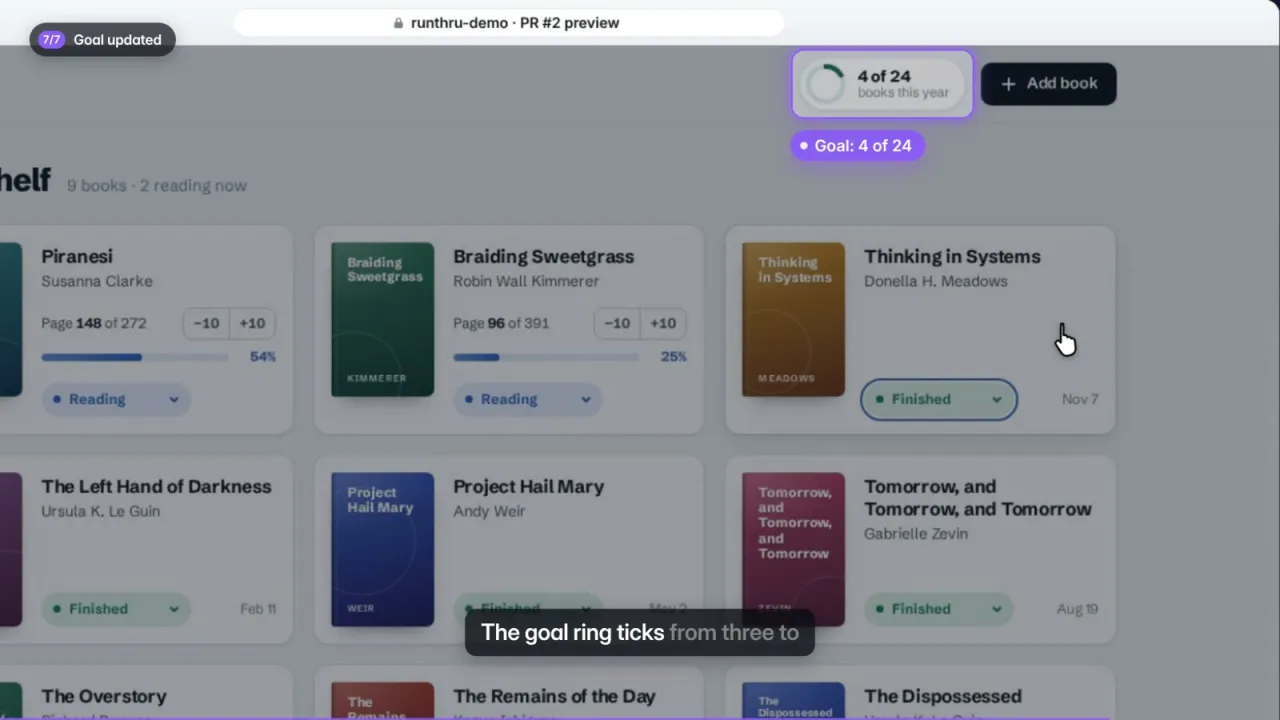
runthrubot commented on #2 Reading progress and a yearly goal

Feature worksQA 9/10

runthrubot commented on Synapse: new trial page

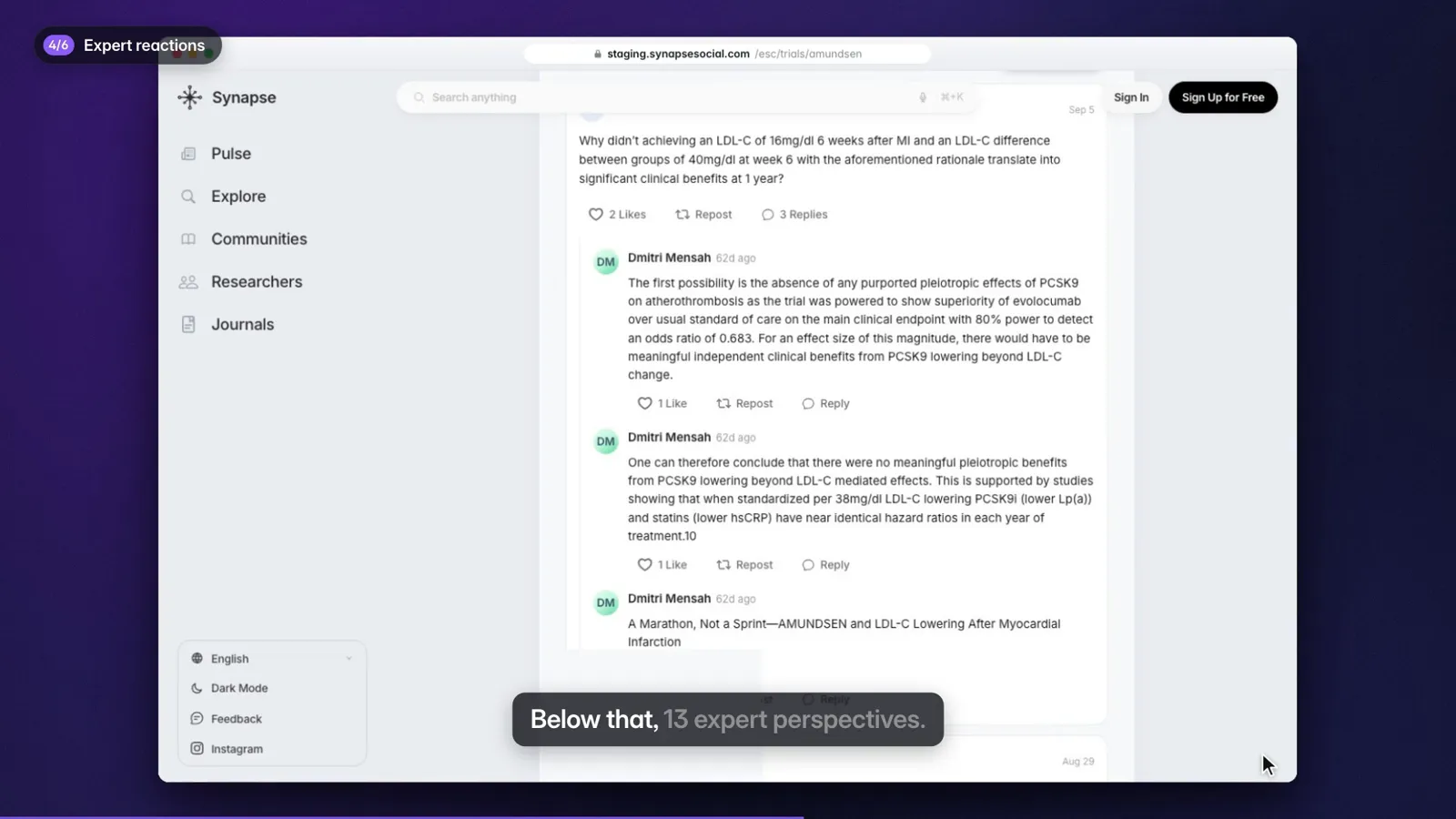
Caught at 0:36: stale dataapp_error

Comments under a trial that “just landed” are dated 62d ago. Nobody told the agent to look. See the frame

Finds deploy previews from
  • Vercel
  • Netlify
  • Render
  • Cloudflare Pages
  • any URL

The diff shows the code. Nobody sees the feature.

Coding agents open pull requests faster than anyone can check them out and click through. Features get approved from the diff, and the rest of the team finds out what shipped when users do.

RunThru checks the part a diff can't show.

  • It uses the feature. A real browser on your preview, clicking through the flow the change touched.
  • It only narrates what's on screen. Every line of the script comes from a screenshot, and the review checks it against the picture.
  • A second model grades it. The agent that films the video never marks its own work.

A demo that fails is a bug report.

When the feature doesn't work, the comment says so, with the timestamp and a suggested fix.

Frame at 0:36 of RunThru's walkthrough of Synapse's staging site: expert comments under a new trial, each dated 62d ago
0:36Comments dated 62d ago on a trial that just landed

Synapse's staging site, unscripted. RunThru was asked to show a new trial page. It flagged expert comments dated “62d ago” under a trial that had “just landed”. It was stale mock data, and no reviewer had noticed.

  • It checks itself. Before a “feature doesn't work” verdict is posted, another model re-checks the claim against the page RunThru captured.
  • CI can read it. Every run writes judge.json with a score, the verdict and each issue.
judge.jsonexcerpt
{
  "score": 9,
  "featureWorks": true,
  "issues": [{
    "category": "app_error",
    "atSec": 36,
    "description": "Comments are dated '62d ago',
      contradicting a trial that 'just landed'.",
    "fix": "Show recent timestamps in the
      mock data."
  }]
}

How it works

Three steps, about five minutes, and nothing to install in your app.

  1. Comment /runthru

    On any pull request with a deploy preview. Add direction in plain English when you want a different take.

    /runthru zoom out when the goal ring updates
  2. It uses the feature

    An agent reads the diff, opens the preview in a real browser, and clicks through the flow the change affects. Then it writes and voices one line per step.

  3. You get a video and a verdict

    One comment with the walkthrough, chapters and the verdict, plus a link to share it. Comment again after a push and the same comment updates.

    Feature worksQA 9/10

The full pipeline, the models it uses and self-hosting are in the docs.

A video your PM can watch. A verdict your reviewer can act on.

For the reviewer

See it run before you read the diff, jump straight to a chapter, and know when a feature is broken.

  • Works on pull requests from Claude Code, Cursor, Codex and Copilot
  • Re-films after a push with one comment
  • Timestamped issues with a suggested fix
  • A RunThru check next to your CI that you can require before merging

For everyone else

Product, design, sales and your users get a narrated walkthrough with captions, in the shape they need.

  • A share page for every video: copy the link or email it, and nobody needs a seat to watch
  • Slack gets each video with its verdict, or only the ones that need attention
  • 16:9 for the pull request, 1:1 and 9:16 for social and the changelog
  • Your choice of narrator, your colors and a music bed on Pro
Synapse staging. Found the flow on its own, scored 9/10.
iOS Simulator. Taps shown as touches, framed in a device.
9:16 for social.

About $1 a pull request. Everyone watches free.

You pay for the videos RunThru makes. Reviewers, PMs and anyone you share them with never need a seat.

Free

Try it on your own repo

$0

5 videos a month720p, RunThru end card

  • The verdict on every video
  • Share page, chapters and transcript
  • Slack notifications
Add to GitHub, free

Pro

For one product team

$29/month

30 videos a monththen $1 per video

  • 1080p60 or 4K, no watermark
  • Square and vertical cuts
  • Your colors, a choice of narrator, music
Start Pro

Team

For the whole engineering org

$99/month

100 videos a monththen $0.90 per video

  • Everything in Pro
  • Priority rendering
  • A Slack channel for each repository
Start Team

Enterprise. Run the same pipeline on your own runners with your own model keys, including localhost, VPN staging and the iOS Simulator.

Talk to us

A video is one finished walkthrough. Runs that fail on our side don't count. Prices in USD.

Questions

Something else? Ask us directly, or read the docs.

What is RunThru?

A GitHub app that shows you a pull request working. Comment /runthru and an AI agent opens the preview deployment, uses the feature the change affects, and films a narrated walkthrough with captions and chapters. A second model watches the video and posts a verdict on whether the feature works. Both land on the pull request in about 5 to 8 minutes.

How is it different from AI code review or test agents?

Code reviewers read the diff, and RunThru runs the change. Test agents write test suites you then maintain, and RunThru takes a fresh look at each pull request with nothing to maintain. Its output is also a narrated video that people outside engineering can watch, along with the verdict.

Does it work on PRs written by AI coding agents?

Yes, and that's where it helps most. Claude Code, Cursor, Codex and Copilot agents open pull requests faster than anyone can check them out. RunThru shows the change running before you read the diff, and the verdict flags features that don't actually work.

Which deploy previews does it support?

Vercel, Netlify, Render and Cloudflare Pages previews are found automatically, along with other providers that report deployments to GitHub. You can also comment /runthru with any URL, set a preview URL pattern in .runthru.yml, or serve a static folder from the pull request's commit.

My preview needs a login. Will it work?

Put demo credentials in .runthru.yml as test_data and tell it where to start with prompt. For Vercel Deployment Protection, add a Protection Bypass for Automation secret as vercel_bypass in a private repo. Self-hosted runs can reuse a signed-in session with runthru login.

What can the app see, and what goes to AI models?

It reads pull requests, their diffs and deploy previews, and writes one comment per pull request that it keeps updating. It can't push code, and it only runs when someone with write access comments /runthru. Models see a curated version of the diff, screenshots of the preview and the script. Claude Opus 5.5 explores and writes, ElevenLabs voices, and Gemini 3.1 Pro reviews. Enterprise runs use your own keys.

Can I share a video outside GitHub, or send it to Slack?

Yes. Every video has its own page with the player, chapters, verdict and transcript, and buttons to copy the link, email it or download the MP4. Anyone with the link can watch, with no account. To post videos to Slack, comment /runthru notify on a pull request: you pick a channel and choose every video or only the ones that need attention.

How much does it cost?

Free is 5 videos a month at 720p, with no card or API key. Pro is $29 a month for 30 videos, then $1 each. Team is $99 a month for 100 videos, then $0.90 each. You pay for the videos RunThru makes, and anyone can watch them without a seat.
Watch your next pull request work.

Install the app and comment /runthru. The video and the verdict land in the thread about five minutes later. Free for 5 videos a month, with no card.

  • Never pushes code and never runs your repository's code
  • Runs only when an owner, member or collaborator comments
  • Videos are hosted by RunThru, never committed. Security details

Not on GitHub yet? Send us a URL.

We'll film a walkthrough of your product and email you the video. Or tell us about your team for Enterprise.